Wavecom TNT-EL Manuál s instrukcemi Strana 29

  • Stažení
  • Přidat do mých příruček
  • Tisk
  • Strana
    / 36
  • Tabulka s obsahem
  • KNIHY
  • Hodnocené. / 5. Na základě hodnocení zákazníků
Zobrazit stránku 28
Page 29
Chapter 3 – TnT+ Portable Appliance
Test Instructions
[continued]
RCD TEST
Menu 2
The TnT+ displays and maintains the last, set trip current value.
If the user wishes to change the value of the trip current the following steps enable the
changes.
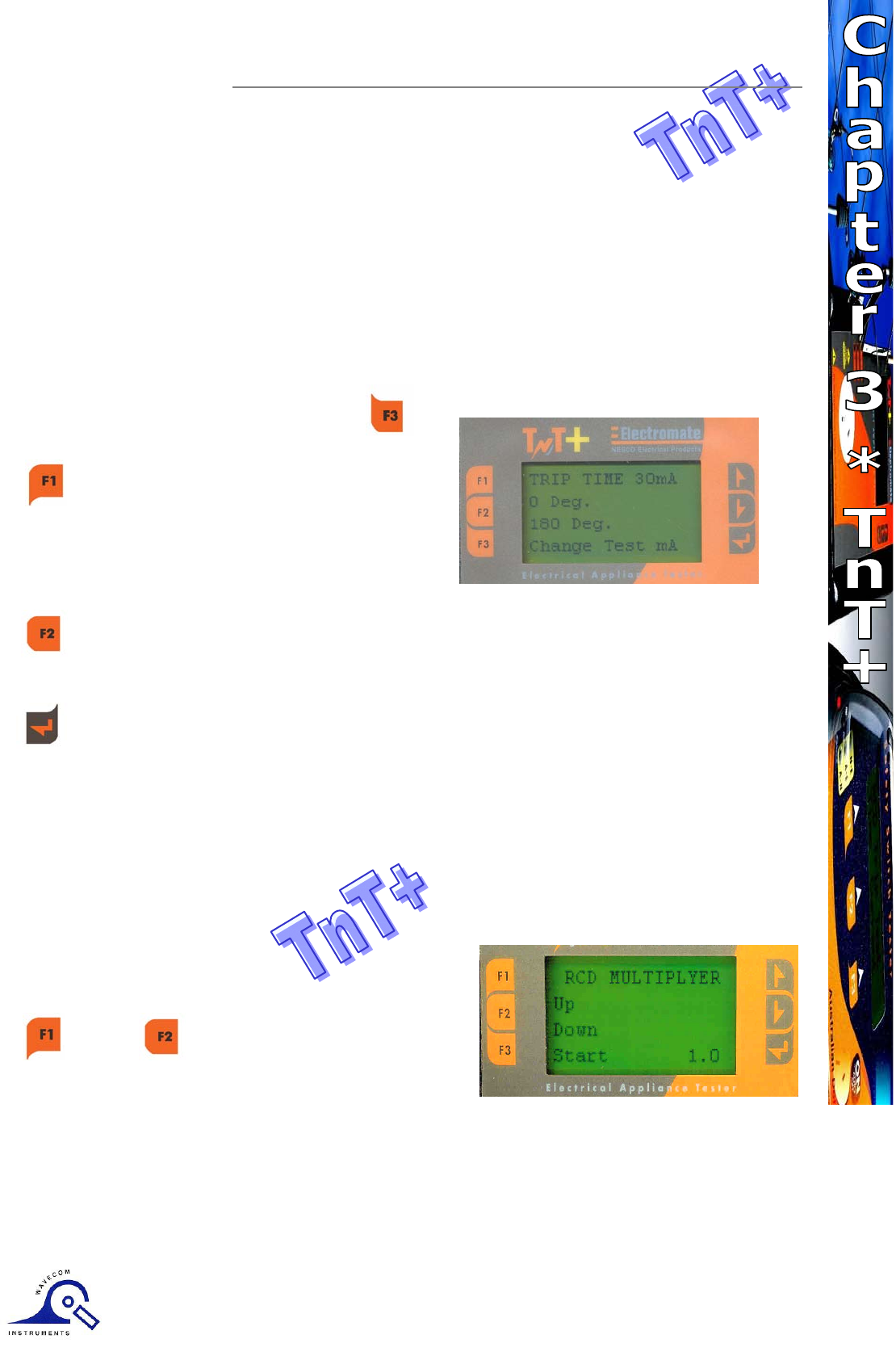
Press and release F3 to display test
current.
Up - This button raises the trip current in
1mA increments to 500mA. Hold the
button and the value will scroll faster the
longer depressed. Once 500mA limit is
reached the value will then loop over and
start again from 0mA.
Down - This button decreases the trip current in 5mA increments. Hold the button
and the value will scroll faster the longer depressed. Once 0mA limit is reached the
value will then loop over and start again from 500mA.
Set - This button sets the selected current for the next trip time test. The TnT+ will
then return to the current trip time test screen.
The displayed trip time is in milliseconds. This is the time taken for the RCD device to trip
once the injected fault current has been applied. The TnT+ injects a true fault current
value using a real time compensation calculation of the actual voltage at the time of test.
Hence delivering a true and accurate trip current no compensation of voltage fluctuations
corrections required.
Voltage range 210 – 270V ac.
As stated above this screen sets the multiplier of
the set test current. Use the F1 or F2 keys to scroll
through
the multipliers X0.5, X1.0, X5.0 of the set current.
Maximum output current = 500mA..
I.E if set test current were 100mA then 100 X 5.0 =500mA.
If set test current = 200mA then maximum out put 5 x 200ma =1A is out of range. Unit will
not deliver this output current and display on Screen “OUT of RANGE”.
Zobrazit stránku 28
1 2 ... 24 25 26 27 28 29 30 31 32 33 34 35 36

Komentáře k této Příručce

Žádné komentáře

Intel BOXD865PCDL manuels

Manuels d'utilisation et guides de l'utilisateur pour Cartes mères Intel BOXD865PCDL.
Nous fournissons des manuels en pdf 1 Intel BOXD865PCDL à télécharger gratuitement par type de document : Fiche technique


Intel BOXD865PCDL Fiche technique (110 pages)


marque: Intel | Catégorie: Motherboards | Taille: 0.71 MB |


Table des matières

Desktop Board

1

Revision History

2

Preface

3

Other Common Notation

4

Contents

5

3 Overview of BIOS Features

6

4 BIOS Setup Program

7

Figures

8

1 Product Description

11

1.1 Overview

12

1.1.2 Board Layout

13

1.1.3 Block Diagram

14

1.2 Online Support

15

1.3 Design Specifications

16

1.4 Processor

19

✏ NOTES

20

1.5.1 Memory Configurations

22

(DIMMs not matched)

23

(Single DIMM)

23

1.6 Intel

24

865P Chipset

24

1.6.2 USB

25

✏ NOTE

26

1.7 I/O Controller

27

1.8 Audio Subsystem

28

1.9 LAN Subsystem

29

1.11 Power Management

30

1.11.1 ACPI

31

1.11.2 Hardware Support

33

CAUTION

34

1.11.2.4 Resume on Ring

35

1.11.2.5 Wake from USB

35

2 Technical Reference

37

2.3 DMA Channels

38

2.4 Fixed I/O Map

38

2.6 Interrupts

40

Technical Reference

41

2.8 Connectors

43

2.8.1 Back Panel Connectors

44

2.8.2.1 Expansion Slots

45

2.8.2.2 Audio Connectors

46

INTEGRATOR’S NOTE

47

INTEGRATOR’S NOTES

49

Single-colored

53

Power LED

53

Dual-colored

53

2.9 Jumper Blocks

56

2.10.1 Form Factor

58

2.10.2 I/O Shield

59

2.11.1 DC Loading

60

2.12 Thermal Considerations

61

2.13 Reliability

63

2.14 Environmental

64

2.15 Regulatory Compliance

65

3.3 Resource Configuration

70

3.5 Legacy USB Support

71

3.6 BIOS Updates

72

3.7 Recovering BIOS Data

73

3.8 Boot Options

74

Rapid BIOS Boot

75

3.10 BIOS Security Features

76

4.2 Maintenance Menu

78

4.3 Main Menu

79

4.4 Advanced Menu

80

4.4.4.1 PATA Submenus

86

Table 48. PATA Submenus

87

(Note 1)

92

(Note 2)

92

(Note 3)

93

4.5 Security Menu

94

4.6 Power Menu

95

4.7 Boot Menu

96

4.8 Exit Menu

99

What This Chapter Contains

101

5.2 Port 80h POST Codes

103

5.4 Speaker

108

5.5 BIOS Beep Codes

108

Table 70. Beep Codes

109


Plus de produits et de manuels pour Cartes mères Intel

Modèles Type de document
KD945GBOKRPAK10 Fiche technique   Intel Board D945GBO, 92 pages
BLKD865GVHZ Fiche technique   Intel Desktop Board D865GVHZ, 19 pages
BLKD945GRWLK Fiche technique   Intel Desktop Board D945GRW, 90 pages
BLKD945PLRNL Fiche technique   Intel Desktop Board D945PLRN, 66 pages
BLKD915GUXLK Fiche technique   Intel LUXEMBURG S775 I915G 10PK, 94 pages
BOXD925XEBC2LK Fiche technique   Intel Desktop Board D925XEBC2 mATX, 110 pages
BLKD915PGN Fiche technique   Intel D915PGN LGA775 ATX DDR, 107 pages
BOXD945PVSLKR Fiche technique   Intel Single box; Gigabit LAN; DDR2 memory support; Integrated audio; Serial ATA supporting Intel® Matrix Storage Technology; IEEE 1394a, 82 pages
BLKD910GLDW Fiche technique   Intel Desktop Board D910GLDW, 80 pages
BLKD915GUXLX Fiche technique   Intel Desktop Board D915GAGLX, LGA775, Pentium 4/Celeron D, 6 pages
BOXDP55KG Fiche technique   Intel DP55KG, 4 pages
BOXD865GVHZL Fiche technique   Intel D865GVHZL S478 mATX 800FSB LAN, 132 pages
BOXD925XBCLK Fiche technique    Intel BLACKCANYON S775 I925X MATX, 72 pages
BLKDQ35JOE Fiche technique   Intel Desktop Board Q35 Express Chipset, 4 pages
KD915GVWBPAK10 Fiche technique   Intel Desktop Board D915GVWB, 84 pages
BLKD865PERL Fiche technique   Intel Desktop Board D865PERL, 132 pages
D915BLWDL Fiche technique   Intel D915PLWDL, 80 pages
BOXD925XHYMLR Fiche technique   Intel Desktop Board D925XHY, 92 pages
BOXDG31PR Fiche technique   Intel Desktop Board DG31PR, 4 pages
D915PCML Fiche technique   Intel D915PCY LGA775 ATX DDR2, 100 pages